1/03/2013

Manipulate WMI system details with WinDbg

While installing Microsoft's System Center Suite I ran into the problem that the installer did not proceed because the assigned memory size of my virtual machine was not enough. The VM was configured to make use of Hyper-V dynamic memory. Unfortunately I could not assign the necessary static amount of memory because my whole physical memory has already been assigned to other virtual machines which I could not turn off.


Therefore, I decided to use WinDbg to attach to the Windows Management Instrumentation process "Wmiprvse.exe" and change the result for the query of the memory size.

There are different possibilities to attach to a process in WinDbg which are described here. In my case the process was already running and I have been simply attaching in WinDbg. I had to attach to the process which was running under the NT AUTHORITY\NETWORK SERVICE account because my installer was executed on another machine and asked remotely the WMI interface for the memory size. If you want to attach to the process automatically when it starts up, you have to use the Remote Debugging techniques of WinDbg with NTSD which are described here. Network services are not allowed to interact with the desktop, therefore using gflags or the registry to automatically launch windbg would not work because the Window of WinDbg would never pop up.
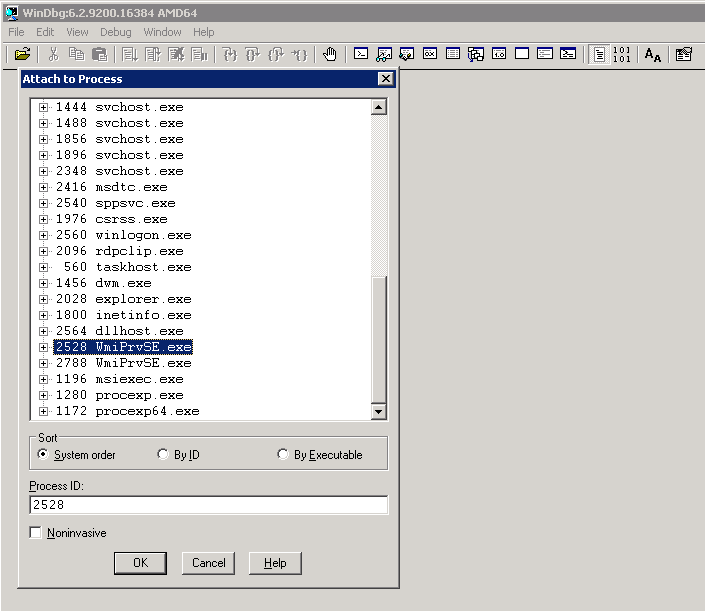

After you attached to the "Wmiprvse.exe" process, you have to make sure that the symbols for the Microsoft libraries are available. Simply enter the following command in WinDbg to load the symbols on demand from the Microsoft Symbol Server.

.sympath SRV*C:\Symbols*http://msdl.microsoft.com/download/symbols

After that we can set a breakpoint for the GlobalMemoryStatusEx method which will be eventually called by the Wmiprvse.exe process to retrieve the memory size.

bp kernel32!GlobalMemoryStatusEx

Now you can simply resume the process with the g-command. The process is running now with the debugger attached with the breakpoint at the GlobalMemoryStatusEx method.

g

At this point of time the installer can be triggered to query for the memory size of the machine. After that you should immediately see in the WinDbg window the following output:

Breakpoint 0 hit
kernel32!GlobalMemoryStatusEx:
00000000`76f38928 ff2522500900    jmp     qword ptr [kernel32!_imp_GlobalMemoryStatusEx (00000000`76fcd950)] ds:00000000`76fcd950={KERNELBASE!GlobalMemoryStatusEx (000007fe`fd845c90)}

The breakpoint has been hit and now I have been stepping through the assembler commands of the GlobalMemoryStatusEx methods with the WinDbg p-command. Here you see the step-by-step debugging output:

0:006> p
KERNELBASE!GlobalMemoryStatusEx:
000007fe`fd845c90 4881ece8000000  sub     rsp,0E8h
0:006> p
KERNELBASE!GlobalMemoryStatusEx+0x7:
000007fe`fd845c97 833940          cmp     dword ptr [rcx],40h ds:00000000`0130d3d0=40000000
0:006> p
KERNELBASE!GlobalMemoryStatusEx+0xa:
000007fe`fd845c9a 0f8590090200    jne     KERNELBASE!TlsGetValue+0x11c0 (000007fe`fd866630) [br=0]
0:006> p
KERNELBASE!GlobalMemoryStatusEx+0x10:
000007fe`fd845ca0 4533c9          xor     r9d,r9d
0:006> p
KERNELBASE!GlobalMemoryStatusEx+0x13:
000007fe`fd845ca3 48899c24f0000000 mov     qword ptr [rsp+0F0h],rbx ss:00000000`0130d2b0={cimwin32!MyCWin32ComputerSystemSet (000007fe`f52a0ea0)}

...

0:006> p
KERNELBASE!GlobalMemoryStatusEx+0x16e:
000007fe`fd845dfe 48894b28        mov     qword ptr [rbx+28h],rcx ds:00000000`0130d3f8=0000000000000000
0:006> p
KERNELBASE!GlobalMemoryStatusEx+0x172:
000007fe`fd845e02 482b8c2488000000 sub     rcx,qword ptr [rsp+88h] ss:00000000`0130d248=00e08d0200000000
0:006> p
KERNELBASE!GlobalMemoryStatusEx+0x17a:
000007fe`fd845e0a 48894b30        mov     qword ptr [rbx+30h],rcx ds:00000000`0130d400=0000000000000000
0:006> p
KERNELBASE!GlobalMemoryStatusEx+0x17e:
000007fe`fd845e0e 488bbc24e0000000 mov     rdi,qword ptr [rsp+0E0h] ss:00000000`0130d2a0=f01b150000000000
0:006> p
KERNELBASE!GlobalMemoryStatusEx+0x186:
000007fe`fd845e16 488b9c24f0000000 mov     rbx,qword ptr [rsp+0F0h] ss:00000000`0130d2b0=d08e150000000000
0:006> p
KERNELBASE!GlobalMemoryStatusEx+0x18e:
000007fe`fd845e1e 4881c4e8000000  add     rsp,0E8h
0:006> p
KERNELBASE!GlobalMemoryStatusEx+0x195:
000007fe`fd845e25 c3              ret
0:006> p
cimwin32!CWin32ComputerSystem::GetCompSysInfo+0x32a:
000007fe`f50d677a 413bc4          cmp     eax,r12d
0:006> p
cimwin32!CWin32ComputerSystem::GetCompSysInfo+0x32d:
000007fe`f50d677d 7418            je      cimwin32!CWin32ComputerSystem::GetCompSysInfo+0x347 (000007fe`f50d6797) [br=0]
0:006> p
cimwin32!CWin32ComputerSystem::GetCompSysInfo+0x32f:
000007fe`f50d677f 4c8b842428010000 mov     r8,qword ptr [rsp+128h] ss:00000000`0130d3d8=00e0385400000000
0:006> p

I have been stepping through the GlobalMemoryStatusEx till the return (ret) command. After that I saw that the memory size has been stored in the register r8 (see line "mov r8,qword ptr [rsp+128h]") and I dumped the value of the registers by simply typing r in the WinDbg command window:

0:006> r
rax=0000000000000001 rbx=0000000000158ed0 rcx=000007fffd702000
rdx=00000000966e9000 rsi=0000000000151bf0 rdi=0000000000151bf0
rip=000007fef50d6787 rsp=000000000130d2b0 rbp=000007fef52a0ea0
 r8=000000005438e000  r9=fffffffffffffceb r10=0000000000000000
r11=0000000000000286 r12=0000000000000000 r13=0000000000000001
r14=0000000000000003 r15=ffffffffffffffff
iopl=0         nv up ei pl nz na pe nc
cs=0033  ss=002b  ds=002b  es=002b  fs=0053  gs=002b             efl=00000202
cimwin32!CWin32ComputerSystem::GetCompSysInfo+0x337:
000007fe`f50d6787 488d15ba5b1400  lea     rdx,[cimwin32!`string' (000007fe`f521c348)]

Here we can see that the register r8 contains the value of the memory size 0x000000005438e000 = 1413013504 (decimal) = 1347 MB

At this moment there have been 1347 MB of memory assigned to my virtual machine. But unfortunately the installer asked for 2 GB. Therefore I simply changed the value of the register r8 to 0x0000000080000000 = 2147483648 (decimal) = 2048 MB

r @r8=80000000


Finally, I resumed the process and voila the installer proceeded.

11/29/2012

Cloud Provider

This is the third of a series of blog posts around Cloud Computing. It gives an overview about the current Cloud Computing trends and explains how to set up a private cloud environment with Microsoft's System Center products.

In this post the different cloud solutions currently available are compared. "Cloud" solutions which are not related to infrastructure are not considered in this overview. Meaning every Software-as-a-Service or central data storage solutions like Skydrive or iCloud are out of scope.
Following you find an overview about the main infrastructure and platform cloud solutions:

VMWare Cloud Foundry Microsoft Cloud Amazon Elastic Compute Cloud (EC2) / Amazon Web Services (AWS) Elastic Beanstalk IBM SmartCloud Google AppScale
Description Open-Source solution from VMWare written in Ruby Public Cloud: Windows Azure, Private Cloud: System Center Suite Amazon's cloud hosting solution SaaS/PaaS/IaaS solution from IBM Google's framework for developing highly scalable applications
Cloud Type Private Cloud Public and Private Cloud Public Cloud Public Cloud Public Cloud
Service Model PaaS IaaS, PaaS IaaS, PaaS IaaS, PaaS IaaS, PaaS
Virtualization VMWare ESX Windows Server Hyper-V, VMWare ESX, Citrix Xen Citrix Xen IBM Xen, KVM, Eucalyptus
Supported Technologies ASP .NET, Java, Spring, Ruby on Rails, Sinatra, Node.js, Grails, Groovy, Scala, PHP, Python/Django ASP .NET, Java, PHP, Ruby, Node.js Java, PHP, Ruby, Python, ASP .NET Java, PHP Java, Python, Ruby
Supported Application Servers Java Application Server IIS, Apache Tomcat IIS, IBM WebSphere, Java Application Server, Oracle WebLogic Server, Apache IBM WebSphere (custom)
Supported Databases Microsoft SQL Server, MySQL, Redis, MongoDB Microsoft SQL Server Microsoft SQL Server, MySQL, Oracle Based on DB2 and compatible with Oracle HBase, Hypertable, Apache Cassandra, MySQL Cluster, Redis
Operation Systems Linux, Windows, custom Windows, Linux, custom VHD Windows, Linux Linux Linux
Price Model Not published yet (Beta) Pay-per-use Pay-per-use Price Table Quota-based Pricing

Public Cloud Solutions
Currently, the main players in Public Clouds are Microsoft and Amazon. Amazon comes from an IaaS approach and Microsoft started with PaaS. These are also the areas in which each provider leads the market.
Amazon has in general more experience with Cloud Computing. Their public cloud offers great flexibility and full control over the infrastructure. On the other hand the patch management has to be done by the client. Amazon introduced AWS Elastic Beanstalk which provides a standardized automated deployment approach and the possibility to scale out applications and services easily. But the cloud consumer is still responsible for the underlying virtual machine and the update management.
Microsoft provides an extremely flexible PaaS solution which can be completely customized by invoking custom scripts. As long as installations and configurations are completely scripted and running on the windows environment, there are no limitations with this approach. Microsoft even takes over that patch management for the underlying operating system.

Private Cloud Solutions
In the Private Cloud sector there are at the moment just two alternatives: Microsoft's System Center solution and VMWare's Cloud Foundry. Microsoft is the only vendor which actually supports both, the private cloud and public cloud scenarios as well as a way to shift applications and services smoothly between private and public cloud data centers.
In the following posts I am going to explain in detail what Microsoft’s System Center Suite can offer and how to configure a private cloud environment.

Cloud Terminology

This is the second of a series of blog posts around Cloud Computing. It gives an overview about the current Cloud Computing trends and explains how to set up a private cloud environment with Microsoft's System Center products.

This post explains the key criteria, different approaches and service models of cloud computing.

Cloud Computing Key Criteria
  • Elasticity and Flexibility
    The needed resources like CPU, Memory and Storage can be dynamically allocated. It is possible to quickly scale vertically and horizontally.
  • Self-Service
    The cloud is exposed to the end-user in a way that they can easily control their needed systems and resources. There is no human-interaction needed for creating new virtual machines, deploying applications or scaling them.
  • Completely Automated
    The most important criteria of cloud computing is the automation of the complete infrastructure. Systems and Applications are provided in an automated way where no human-interaction is needed.

Cloud Service Models
  • Infrastructure as a Service (IaaS)
    This service model gives the user the possibility to provision virtual machines on operation system level. It is possible to deploy and run arbitrary software. The customer does not have any control of the underlying cloud infrastructure. But she can manage operating systems, storage and network components like firewalls and load balancers.
  • Platform as a Service (PaaS)
    The customer can deploy applications on PaaS cloud solutions without having access to the underlying infrastructure like operating system, network or servers. The applications are restricted to the supported programming languages and technologies. PaaS solutions provide automated deployment processes, monitoring and easy horizontal scaling features (spreading multiple servers).
  • Software as a Service (SaaS)
    This model allows the customer to use applications hosted externally, like Office and Web Storage solutions. The customer does not have any access to the cloud platform itself.

In my opinion the SaaS model is not directly connected to cloud computing because it could be mainly also provided without a cloud infrastructure. If you take a look at the key criteria above, none of them can be really applied to Software-as-a-Service solutions. That does not mean that some applications are running on a cloud platform to reduce operational overhead and have better flexibility and scalability. It is just not needed to provide this service.

Cloud Computing Types
  • Private Cloud
    The infrastructure is running internally within a company. The applications itself can be exposed to the outside world but the self-service and administration is done within a company and the internal network.
  • Public Cloud
    Public Clouds are available over the internet and can be used by other companies to host their applications and services. The main public cloud solutions are Microsoft's Windows Azure, Google's App Engine and Amazon's Elastic Compute Cloud. They provide usually a pay-per-use price model where the costs depend on how much traffic and resources are used.
  • Hybrid Cloud
    Hybrid clouds are a mix of private cloud and public cloud infrastructures. They consist of company-internal and external infrastructure which builds a federation to establish a communication between each other.

In the following posts I am mainly talking about private Clouds and how they can be built within a company-internal data center.

How to create a Private Cloud?

In the next couple of posts, I would like to describe the current trends around Cloud Computing and how you can actually set up a Private Cloud environment.

First of all, it is important to clarify some terms which are used in the Cloud Computing context. Cloud Computing is used in many cases as a marketing buzzword and this causes a lot of confusion because everybody has another picture about cloud computing.

In this post (and in my opinion also in general) the term Cloud Computing represents an approach how a highly flexible, scalable and completely automated infrastructure can be build up in a data center. This is mainly achieved by virtualizing and automating the completely infrastructure. Additionally, cloud computing is about how this infrastructure can be made available as a self-service for end-users.

If you follow the advertisements around Cloud Computing you realize that it is more and more used for all web applications and web services which provide central storage for data and enable accessibility for a variety of devices, like laptops, tablets, mobile phones and TVs. The TelekomCloud or iCloud from Apple are examples for central data storages but they do not necessarily have a dynamic Cloud infrastructure to serve these services.

In the following posts I am going to explain how you can build up a private cloud based on Microsoft's System Center 2012 components.

- Post 1: How to create a Cloud?
- Post 2: Cloud Terminology
- Post 3: Cloud Provider
- ...

NDepend 4.0 available

The NDepend version 4.0 has been released. For all which do not know what NDepend is, take a look at my previous post.

NDepend is a great tool for static code analysis of .NET code. It is also available for Java "JArchitect" and C++ "CppDepend".

One of the main new features of the version 4.0 is the new query syntax which is based on Microsoft's LINQ. It provides a comprehensive way of analyzing your code.

The following example checks whether a base class uses one of its derivatives:
warnif count > 0 from baseClass in JustMyCode.Types
where baseClass.IsClass && baseClass.NbChildren > 0
let derivedClassesUsed = baseClass.DerivedTypes.UsedBy(baseClass)
    where derivedClassesUsed.Count() > 0
select new { baseClass, derivedClassesUsed }

This example is quite simple, but with these new query capabilities it is even possible to make more complex queries. One of the best examples you find here. These queries highlight namespace cycles and mutually dependent namespaces by using NDepend queries. These queries allow checking if the code follows a layered approach even on namespace level. Namespace cycles or mutually dependent namespaces cause usually a higher effort when changing certain code parts. The query allows to verify that and shows even suggestions which namespace should not use the other one based on the analysis which namespaces uses more types than the other one.


The image shows the mutually dependent namespaces. Furthermore it highlights that the namespace "TSTune.BL.DTO" should most probably not use the "TSTune.BL.Logic" because 11 types of DTO are used by Logic and just 1 type is used by DTO. There is a high chance that the use of this type is a mistake.

This example shows that the new query language of NDepend provides great possibilities to verify your code and identify bad parts. If these checks are performed as part of the continuous integration process, they can be easily avoided and result in the end to a much more maintainable solution.

9/22/2012

JSAnalyse for VS 2012 has been released

I am happy to announce a new release of JSAnalyse. You can download the latest version on the codeplex project JSAnalyse.

The new release has a couple of improvements:
- Visual Studio 2012 support
- Multiple JavaScript dependency diagrams can be created
- Enhanced Caching mechanism to support bigger object graphs
- Detects even more static references between JavaScript files

For those who do not know what JSAnalyse is, read my previous post "JSAnalyse published on codeplex".

8/27/2012

TFS 2012 Build Server Installation - Fails with error "System.FormatException: Index (zero based) must be greater than or equal to zero and less than the size of the argument list."

If you get during the TFS 2012 Build Server Configuration an error message with the following error message:

"System.FormatException: Index (zero based) must be greater than or equal to zero and less than the size of the argument list."

This is a bug in the Build Server configuration tool. You can fix it by turning on your Windows Firewall.

The configuration tool tries to check the firewall and add an exceptional rule for the build server port which causes an exception because the firewall is not running. Microsoft actually handles this exception, but within the catch block they try to write a warning message out which unfortunately causes another exception.

Here are the results by using reflector:

Assembly: Microsoft.TeamFoundation.Build.Config.dll
Name: Microsoft.TeamFoundation.Build.Config, Version=11.0.0.0, Culture=neutral, PublicKeyToken=b03f5f7f11d50a3a
Class: BuildServiceHostUtilities
private static void RemovePermissions(Uri baseUrl, bool deleteFirewallException)
{
    if (baseUrl != null)
    {
        string permissionedUrl = GetPermissionedUrl(baseUrl);
        try
        {
            ConfigurationHelper.FreeUrlPrefix(permissionedUrl);
        }
        catch (Exception exception)
        {
            LogWarning(Resources.Format("CannotFreeUrlPrefix", new object[] { permissionedUrl, exception.Message }));
        }
        if (deleteFirewallException)
        {
            try
            {
                ConfigurationHelper.DisableFirewallException(baseUrl.Port);
            }
            catch (COMException exception2)
            {
                if (exception2.ErrorCode != -2147023143)
                {
                    LogWarning(Resources.Format("FailedDeletingPortExceptionFor", new object[] { baseUrl.Port, ExceptionFormatter.FormatExceptionForDisplay(exception2) }));
                }
            }
        }
    }
}

The RemovePermissions method in the BuildServiceHostUtilities tries to add an exception for the Build Service port in the line ConfigurationHelper.DisableFirewallException(baseUrl.Port);

This causes an COMException which will be just logged as an warning. So far so good. But unfortunately the call for formatting the warning message gets just two parameters passed. If we take a log in the resources of the dll the "FailedDeletingPortExceptionFor" text has 3 parameters defined:

Resources.Format("FailedDeletingPortExceptionFor", new object[] { baseUrl.Port, ExceptionFormatter.FormatExceptionForDisplay(exception2) });

FailedDeletingPortExceptionFor=Failed to remove firewall exception {1} for port {0}. Details: {2}

This finally causes the "System.FormatException: Index (zero based) must be greater than or equal to zero and less than the size of the argument list.".